
Receive a transmittal
This page is for guests. A transmittal is a formal package of documents sent to you by a project team. Constecca keeps a record of what was sent, when, and to whom.
The email
When a project team sends you a transmittal through Constecca, you receive an email titled with the transmittal's code and subject. It names who issued it and the project, and lists every document on it with its revision.
The files are not attached to the email. The email ends with a link to the transmittal in Constecca, where you open them.
If you did not have a guest account yet, sending the transmittal created one for you.
Open a transmittal
Click the link in the email
If you are already signed in, the transmittal opens.
Sign in if Constecca asks
If you are signed out, Constecca shows the Guest access page. Enter your email, click Send sign-in link, and click the link in the new email. See Sign in as a guest.
Find the transmittal on your home page
After you sign in, Constecca opens your guest home. The transmittal is listed under Shared with you. Click it.
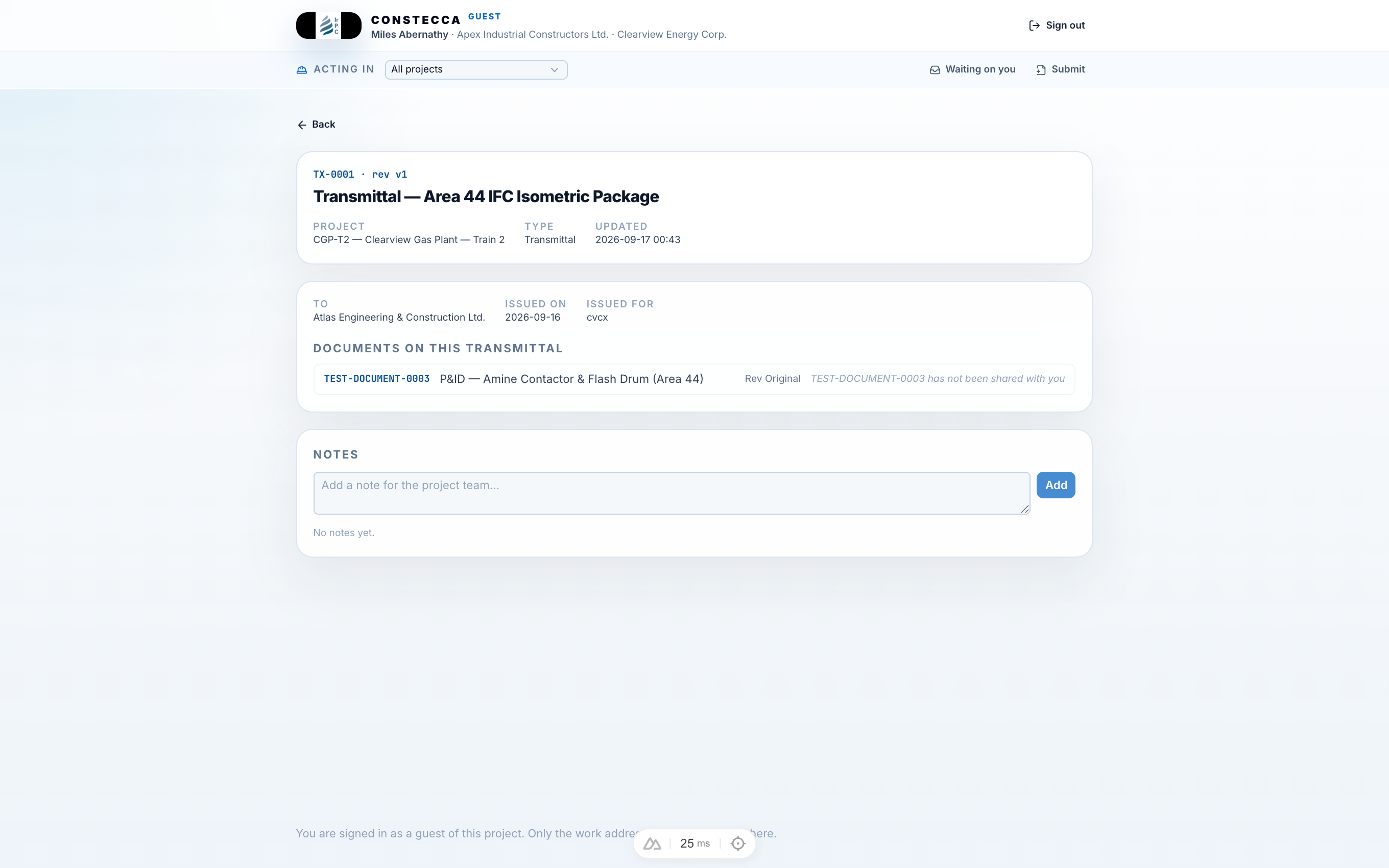
What the transmittal shows
The page shows the cover details the team filled in:
- To: the company the transmittal is addressed to.
- Attention: the person it is for.
- Issued on: the date it was issued.
- Issued for: the purpose the team issued it for.
- Any remarks the team added.
Under Documents on this transmittal, each document is listed with its code, title and revision. Click Open on a row to view that document. See Open a shared document.
A row that reads has not been shared with you is a document on the transmittal that you do not have access to. Ask the project team if you need it.
Your access to a transmittal, and to the documents it shared with you, stays after it is issued.
Reply to the team
Add a note in the Notes section at the bottom of the transmittal page, for example to confirm you received it or to ask a question. The project team reads your note on their side. You see only your own notes, not the team's or other recipients'.